01 / Identify
Read before you touch.
Identity, firmware and module serials first, so every decision starts from facts.
Drone service software for Windows
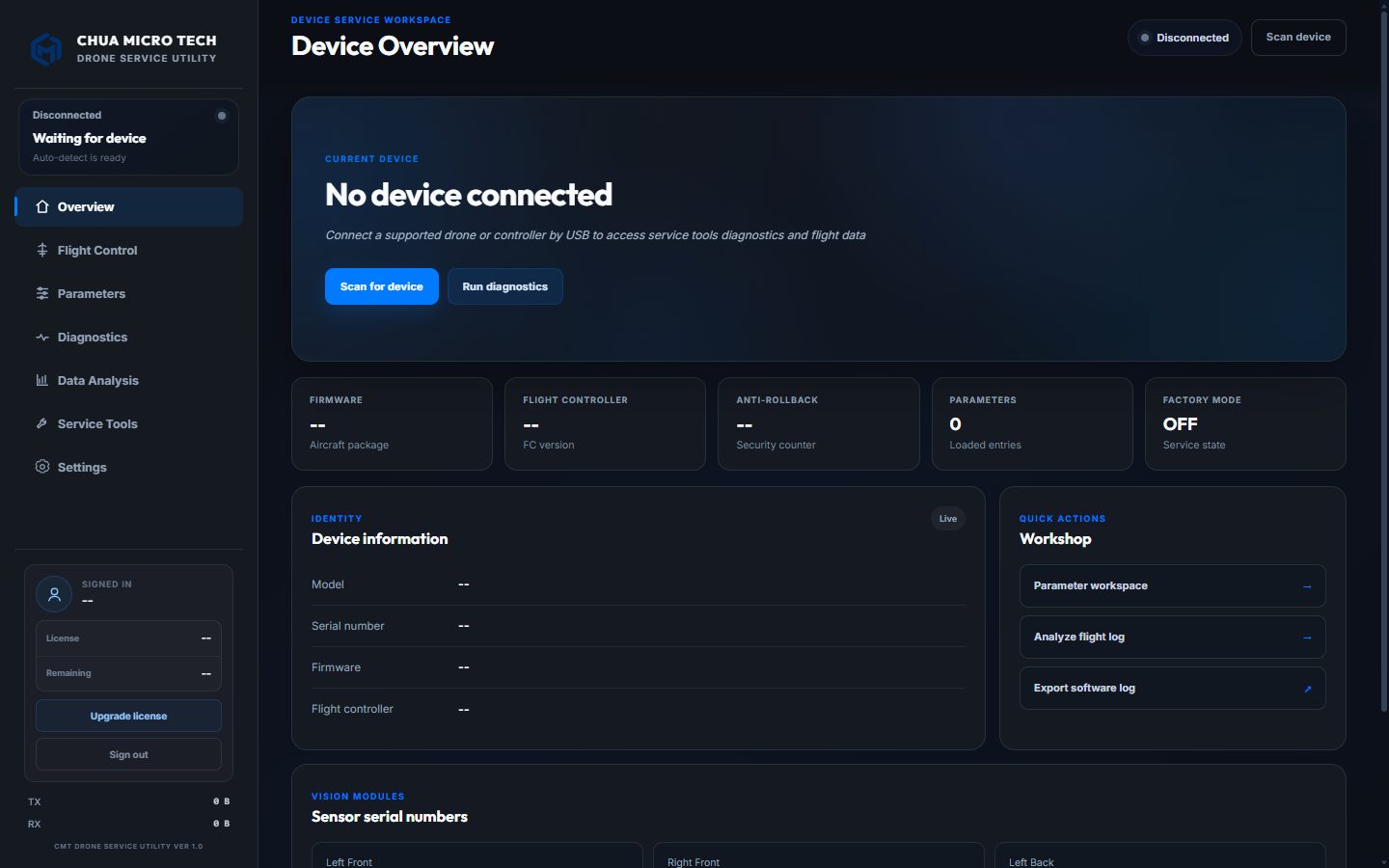
01 / Inside the workspace
Walk through the real interface one view at a time. Pick a screen below, or open it full size to read the detail.
Identify
Plug in a supported drone or controller by USB and the overview fills itself in.
These are screenshots of the app, not a live connection. What each tool can do depends on the aircraft, its firmware and your licence.
01 / Identify
Identity, firmware and module serials first, so every decision starts from facts.
02 / Diagnose
Live telemetry and a twelve-module link test point to the part that is failing.
03 / Calibrate
IMU and deep gimbal calibration with checklists, staged progress and clear results.
04 / Repair data
Camera, fisheye and TOF serial repairs are written to a new copy after a server check.
05 / Firmware
Model routing and a rollback-level check come before every install.
06 / Flight logs
Flight records turn a customer's story into times, distances, altitudes and serials.
02 / How a job runs
Made for technicians who want to know exactly what is on the bench before they change anything.
Open the app on your Windows PC and plug the drone or controller in by USB. It is detected automatically.
Aircraft WorkspaceCheck identity, firmware, live sensors and the link test, and open the flight log if there is one.
Readings DecisionFollow the guided tool for the job and confirm the result before the aircraft goes back.
Procedure ResultA service tool, not a miracle. Software cannot fix a broken part. Repair physical damage and confirm the model is supported before running calibration or write procedures.
03 / Made for every bench
Screens, notices and error messages, including those with numbers in them, follow the language you choose on first launch. Switch at any time in Settings.
04 / Model-aware
The firmware flasher keeps a profile for each aircraft below and routes it to the engine that suits it. Other tools vary by model, so send us yours to confirm.
WM160Legacy engineWM1605Legacy engineWM161Legacy engineWM1615Legacy engineWM163Specialized engineWM162Legacy engineWA1617Specialized engineWM231Legacy engineNo firmware profile for that yet. Ask us about your aircraft.
Aircraft names are used only to say which models the app works with.
05 / Licence
Every plan opens the whole workspace on one workstation. The only difference is how long it lasts.
Monthly
For short projects and busy seasons.
Yearly Recommended
For the everyday workshop.
Permanent
Buy once and keep it on the bench.
 Windows
CMT Drone Service Utility / Windows desktop
Message us for the installer, create your CMT account on first launch, then activate your workstation with a licence key.
Installing the app does not activate a licence.
06 / Before you connect
Have a particular aircraft or error in mind? Ask us before you choose a plan.
Ask us on WhatsAppA Windows desktop app for drone technicians. It reads a connected aircraft, shows live telemetry, edits parameters, tests every module, analyses flight logs and runs guided calibration and firmware procedures.
Not always. Tools depend on the model and its firmware. The firmware flasher keeps profiles for the aircraft listed above. Send us your model and firmware version and we will tell you what applies.
No. A broken gimbal motor, cable or board needs a hardware repair first. The app helps you find the fault and finish the job once the hardware is sound.
Only in duration: Monthly runs 30 days, Yearly 365 days, and Permanent does not expire. Each opens the full workspace on one workstation.
Yes, for sign-in, licence checks, updates and calibration file analysis, which runs on the CMT server so your original files stay untouched.
English, Bahasa Melayu, Simplified Chinese, Japanese, Korean, French, German, Spanish and Tamil.
No. It is developed independently by Chua Micro Tech and is not affiliated with, authorised or endorsed by DJI or any other manufacturer.
Message us on WhatsApp at +60 12-594 9451 or email chuamicrotech@gmail.com. We reply Monday to Saturday, 9:00 AM to 10:00 PM.
Direct support
Send the aircraft model, firmware version and what you are seeing. We help with compatibility, licensing and getting set up.
Talk to us +60 12-594 9451 · chuamicrotech@gmail.com